Thursday, May 31, 2012

How is a whale like a web-page?

   Students like linear texts.  Teachers like linear texts.  There is a reason why textbooks have nice bold vocabulary words, questions for comprehension, headings, and all that jazz.  It's possible to open a textbook, gather information, but not actually READ anything.  The kids are comfortable with this; these texts allow them to get through lots of reading, do well on their AP Bio exam, etc.

    But there's something to a text that is creative, non-linear, and different.  When students read Moby-Dick for the first time, it's incredibly disorienting.  Chapters spring from everywhere.  They have to work to understand the connections between chapters, that, on the surface, appear so different.  There is a lot of work, but the ultimate effect is masterpiece.

    Such is the case with hypertext.  Those that say that hypertext is a liability compared to linear text, that it puts increased cognitive demands on the learner, totally miss the point.


Wednesday, May 30, 2012

Hypermedia

    In 1996, D.H. Jonassen wrote a piece about the power and possible applications for Hypermedia in the classroom.
    Now, hypermedia is basically mainstream.  Students and teachers, along with almost everyone connected to the internet, uses the world wide web on a daily basis.  We are used to having an incredible array of interconnected knowledge at our fingertips.
The city of Dresden
     What has happened recently is for some companies, especially Google, to make these hypertext incredibly visually and information rich, and for them to resemble real life sights.  I'd like to give a few examples of Google applications that our beautiful, content rich applications.
     Google Earth is a wonderfully ambitious platform.  It attempts to document the world as it actually is, both in 2 and 3 dimensions.  It then superimposes information: building names, stores, streets, natural landmarks, on top of the image.  Google Earth has even developed ways for students to create "tours" and move around the world.  Students can create their own labels, or "nodes," of information, tagged at appropriate places.  Even more recently, Google Earth has allowed users to create fictional or historical buildings and cities.
     Part of what makes Google Earth such an effective and widely used example of hypermedia is that its mission and flexibility is so broad.  It really attempts to map the entire earth.  It then lets the user utilize that map and tag information that he or she deems appropriate.  You can use the application for geography, literature, art, history, or science.  Because it is so successful in creating an accurate representation of the world, using it is almost like not looking at a computer at all, but playing with reality.
Body Browser from Google
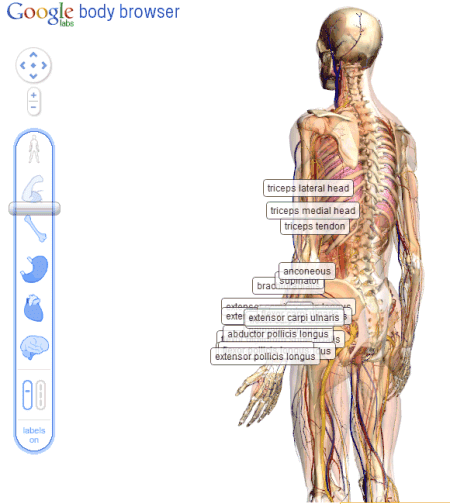
    Google BodyBrowser is a take off of Google Earth, but with the human body.  Science teachers used to have diagrams, skeletons, and textbooks in their class.  Now the skeleton is the textbook.  The student can look at skeletons, organs, different systems, or any combination.  The resource is fully searchable.
    Adding information to a realistic, but flexible image is one of the great attributes of Google Earth and BodyBrowser.  Students can see how different organs and systems interact within the human body, but they can also explore, almost as if they are going into a cadaver, but anything they click on can bring more information to the screen.  It would be a very powerful tool for biology students to go and explore, report back their findings, and then to discuss the disagreements or issues that students found.  BodyBrowser is complete discovery, complete freedom of information within the human body.
       There are other ways to give students a basic blank canvas, and ask them to create their own content and structure on top of it.  Inspiration Maps is an example of a solid product that allows students to use Ipads and the like to create their own maps.
       With Inspiration Maps one could create a pretty similar product to what Jonassen describes in the second half of his piece.  However, it's important to note that this really is a blank canvas.  The students have freedom to create their own "hyper" information system, but they would have to create everything themselves.  I believe the power of Google Earth and Google BodyBrowser, is that they create a visual template for the students to explore and then add to them.
        I'm not sure that in 1996 we could invision that a company would map out the entire Earth or human body.  But now we have enormous resources for our kids to use and then augment to meet their learning needs and to show their understanding of a subject.
   

Sunday, May 20, 2012

Digital Natives--Digital Immigrants

     Saying something new about Prensky's "Digital Natives Digital Immigrants" is now almost impossible.  I'm not sure if I know of any piece of writing that has produced more discussion or agreement.  Prensky spawned cliches and forced educators to take sides, to declare themselves.

     So what does my digital passport read?  I'm 27, so I was growing up when the promise of the personal computer was beginning to develop.  I remember tying up my parents phone line on AOL, playing the earliest version of the Oregon Trail, and downloading programs to hack Instant Messenger.  I was always more comfortable working with text on the screen, typing rather than writing.  Organizing my thoughts, files, and life, always seemed easier on the computer.

Wednesday, March 21, 2012

Cetology Project

Cetology Project--70 points

Melville includes about 20 chapters that many readers call the “Cetology” chapters. Cetology is a fancy word for the scientific study of the whale. The main questions we seek to answer while we read and study this chapter is:

Why does Melville include these sections? What does science have to teach us about literature and vice versa?

Step 1: You will be assigned one of these chapters:

-Squid (Whalefood)
-Brit (Ocean biology vs. Land biology)
-The Whiteness of the Whale (albinoism in science and different cultures)
-The Sperm Whale's Head--Contrasted View
-The Right Whale's Head--Contrasted View
-The Battering Ram (forehead)
-The Great Heidelburg Tun (a compartment in the whale's skull)
-The Prairie (head)
-The Blanket (skin)
-The Nut (brain)
-The Fountain (the spout)
-The Tail
-Ambergris
-The Cassock (the reproductive organs)
-A Measurement of the Whale's skeleton (the skeleton)
-The Fossil Whale (the decomposition of the whale)


Step 2: Read
Read the biology report.
Take notes on the specific features of the whale and why they are there. Make an outline about the most important facts in the report.

Read your chapter
Takes notes on the specific scientific details on the whale. Underline those passages. Keep in mind: why are these facts being included?


Step 3: Think and write
Write a short essay that answers the following questions. Be sure to cite examples from the text AND THE BIOLOGY REPORT in your answer.
  1. What scientific concepts or facts does Melville allude to? What, if anything, does he fail to mention? What does he get wrong? What does he get right?
  2. Each part of the whale is a symbol that tells part of the whale’s story. What is the figurative significance of your assigned part of the whale? How do the scientific facts add to figurative meaning?
  3. What is the ultimate effect of the scientific information in the book?


Rubric: (70 points)

10 points: Introduction that clearly mentions the main ideas in each body paragraph. The introduction is as specific as possible.

15 points: 1st paragraph
Clear topic sentence that specifically mentions all the main ideas in the paragraph
Use of direct quotations from the text
Close readings, direct discussin of the quotations to link back to main ideas. The 8th grade biology report is quoted or referred to DIRECTLY. Additional scientific sources may be quoted.

15 points: 2nd paragraph
-Clear topic sentence that specifically mentions all the main ideas in the paragraph
-Use of direct quotations from the text
-Close readings, direct discussin of the quotations to link back to main ideas. Figurative significance has quotes to support close readings. Those ideas are linked back to specifics in the 1st paragraph regarding scientific facts.

15 points: 3rd paragraph
-Clear topic sentence that specifically mentions all the main ideas in the paragraph.
-A discussion that links back to previous ideas (in the 1st and 2nd paragraph) and draws larger conclusions about the effect on the reader.

15 points: Formatting:
Sentence strucutre, quote citations, introducing quotes, punctuation, word use, missing words, run-on sentences, etc...

Thursday, February 23, 2012

Moby-Dick Allegory Assignment

Allegory Assignment

Your assignment is to write a short essay explaining the connections between Captain Ahab and a historical figure. You can explain the allegory as a piece of "historical allegory" or "portentous allegory."

If you're interested in historical allegory, you need to connect Captain Ahab to a figure from 1830-1851. There are specific people that Melville was thinking about, reading about, hearing, and seeing, when he was constructing Ahab. You need to connect Ahab to one of these figures.

If you're interested in portentous allegory you need to connect Captain Ahab to a real person from 1851-present day. Part of what makes Melville great is that he anticipates leaders, movements, and issues that are well before his time.

Regardless of your time period your essay needs to accomplish the following:
-A 2-3 sentence introduction that explains the connection between the two figures. (Thesis).
-A paragraph outlining specific traits in the historical figure with at least 3 cited sources.
-A paragraph tracing the same traits in Ahab that incorporates close reading from at least 3 quotes from the text.
-A short conclusion

All in all, we're looking at 600-800 words here. Be creative withe the figures you pick, and be specific with the traits that you are identifying. "Strong leader" is not going to cut it.

Rubric:
Intro: 10 points
Accurate thesis sentence that identifies the similar traits between the two figures.
1st Paragraph: 20 points
10 points: Multiple traits identified by a topic sentence, accurate use of citations, 3 sources.
10 points: In depth close reading looking at details from the selection. Avoiding summary.
2nd Paragraph: 20 points
10 points: Multiple traits identified by a topic sentence, accurate use of citations, 3 quotes from Moby-Dick.
10 points: In depth close reading looking at details from the selection. Avoiding summary.
Formatting: 10 points
Paragraph use, sentence structure, specific language, punctuation, cliches, missing words, etc...

Total: 60 points